Skip to the content
CynderHost
  • Status
  • Main Site
  • Client Portal
  • Contact Support
  • Status
  • Main Site
  • Client Portal
  • Contact Support

cPanel

39
  • Getting Started
  • Setting Up And Redirecting To https (SSL)
  • Installing WordPress, Drupal, or Joomla
  • How To Upload And Add Site Files
  • Backing Up cPanel and Websites
  • “SSL Isn’t Working. My Site Shows Not Secure”
  • How To Migrate Your Website From cPanel
  • Export Or Import A MySQL Database With phpMyAdmin
  • Fix “Resource Limit Reached” Errors
  • PHP Workers
  • Change PHP Version in cPanel
  • Enabling GZIP Compression
  • HTTPS Version of URL Is Showing the Wrong Site
  • Adding a Subdomain/Other Domain As a Copy Of a Site (cPanel)
  • Enable Brotli Compression
  • Login To cPanel
  • How to Edit DNS Records in cPanel
  • Adding PHP Extensions (cPanel)
  • Increasing PHP/WordPress Max Upload Size
  • Reinstall WordPress
  • Viewing Hidden (dot) Files in the cPanel File Manager
  • Whitelisting Emails Addresses or Domains from Spam Filter
  • Blacklisting Emails Addresses or Domains from Spam Filter
  • 550 Authentication Required
  • Manage Websites via WP Toolkit
  • Remote MySQL Not Working (Server Connection Error)
  • Cloudflare Not Working When SSL is Set to “Full (Strict)”
  • Restoring a Backup in cPanel
  • Accessing PHPMyAdmin
  • Connecting to and Using FTP
  • Creating a Backup in cPanel
  • Setting Up a Staging Site for WordPress (cPanel/Plesk)
  • Resetting cPanel/Plesk Password
  • Moving/Copying a WordPress Site to a Different Domain in the Same Hosting Plan
  • Add a Subdomain in cPanel
  • Editing PHP.ini Configuration Variables
  • Cloudflare, WordPress, and Redirect Loops
  • Unblocking your IP Address on cPanel
  • Connecting a Cloudflare-Registered Domain

Domain

11
  • Nameservers
  • Adding and Setting Up Domains
  • How To Setup Cloudflare As A CDN
  • How Long Does DNS Propagation Take? Can You Make It Faster?
  • Migrating Your Domain/Website With Zero Downtime
  • Clearing Your DNS Cache (Browsers)
  • Clearing Your DNS Cache (OSes)
  • Previewing Your Website
  • Add a Subdomain in cPanel
  • Connecting a Cloudflare-Registered Domain
  • Setting Up a Domain on High Performance Plans

Plesk

25
  • How To Install WordPress
  • Backing Up Plesk and Websites
  • Export Or Import A MySQL Database With phpMyAdmin
  • Supported PHP Extensions (Plesk)
  • Enabling GZIP Compression
  • How to Edit DNS Records in Plesk
  • Reinstall WordPress
  • FTP Not Working on High-Performance Plans
  • Disabling Caching
  • Unblock an IP From the Firewall
  • Block a URL (Page Rules)
  • Manage Websites via WP Toolkit
  • AWStats/Webstats and Bandwidth Don’t Match Up
  • Contact Form 7 Submission Does Not Work (Loads Forever)
  • Accessing PHPMyAdmin
  • Connecting to and Using FTP
  • Setting Up a Staging Site for WordPress (cPanel/Plesk)
  • Resetting cPanel/Plesk Password
  • Raising the PHP Upload Limit / Max Post Size
  • Moving/Copying a WordPress Site to a Different Domain in the Same Hosting Plan
  • Setting Up DNS Records for Email
  • Adding a New Domain
  • Managing SSL on High Performance Plans
  • Connecting a Cloudflare-Registered Domain
  • Setting Up a Domain on High Performance Plans

WordPress

28
  • How To Speed Up Your WordPress Website
  • Debugging PHP, WordPress, And .htaccess Errors (5XX)
  • Backing Up A WordPress Website
  • How To Migrate A WordPress Website
  • Building Websites With WordPress And Page Builders
  • Using WordPress Plugins
  • WP 5.5 Update Breaks Site
  • Nulled Themes And Premium Plugins
  • Make WordPress Accessible From Multiple Domains
  • Images Not Showing Up After Migration
  • Mixed Content Warnings in WordPress
  • Increasing PHP/WordPress Max Upload Size
  • Reinstall WordPress
  • 404 Errors on WordPress When Accessing Pages, Posts, and Archives
  • Setting Up the CynderHost WordPress Plugin
  • Manage Websites via WP Toolkit
  • Put WordPress in Maintenance Mode
  • Have WordPress Homepage Display a Static Page
  • Disabling WordPress Plugin Without WP Admin Access
  • Locked Out From Website By WordPress Plugin
  • WordPress Security 101: Keeping Your Site Secure
  • Contact Form 7 Submission Does Not Work (Loads Forever)
  • Restoring a Backup in cPanel
  • Accessing PHPMyAdmin
  • Can’t Access WordPress Admin: “Sorry, you are not allowed to access this page.”
  • Setting Up a Staging Site for WordPress (cPanel/Plesk)
  • Raising the PHP Upload Limit / Max Post Size
  • Moving/Copying a WordPress Site to a Different Domain in the Same Hosting Plan

Web Development

7
  • How To Create A Hello World Website
  • Debugging PHP, WordPress, And .htaccess Errors (5XX)
  • Changing Your Hosts File
  • Clearing Your DNS Cache (Browsers)
  • Clearing Your DNS Cache (OSes)
  • Previewing Your Website
  • Setting Up a Staging Site for WordPress (cPanel/Plesk)

Client & Billing

14
  • Contacting Support
  • Site/Service Has Been Suspended or Terminated
  • Overdue And Recurring Invoices
  • Can’t Verify My Email Address
  • How To Cancel a Subscription
  • Invoice Payment Isn’t Showing Up
  • Can’t Sign In With Google
  • Pay an Invoice
  • Email Verification Isn’t Working
  • Setting Up a Stripe/CC Recurring Payment
  • Setting Up a Recurring PayPal Subscription
  • Resetting cPanel/Plesk Password
  • How to Upgrade or Downgrade a Plan
  • Check Remaining Funds/Balance

NitroPay

6
  • What Is NitroPay?
  • Signing Up For NitroPay
  • NitroPay Payments
  • How To Add Ads To Your Site
  • Setting Up Your Ads.txt
  • Ad Placement Tips for Best Earnings

API

3
  • Cache API Reference
  • Setting Up the CynderHost WordPress Plugin
  • CynderHost High Performance API Key

Emails

12
  • How to Adjust Spam Filters?
  • Incoming Emails Going to Spam?
  • Whitelisting Emails Addresses or Domains from Spam Filter
  • Blacklisting Emails Addresses or Domains from Spam Filter
  • 550 Authentication Required
  • Microsoft Office 365 / Hotmail / Gmail Delivering My Emails to Spam
  • Email Rejected By Gateway
  • Setting Up DNS Records for Email
  • Adding a New Domain
  • Logging into the Email Panel
  • Creating an Email Account
  • Checking Email via Webmail, and IMAP/POP3
View Categories

Editing PHP.ini Configuration Variables

< 1 min read

0:00 / 0:16
  • View as Markdown Open this page as plain Markdown (opens in a new tab)
  • Open in ChatGPT Ask questions about this page (opens in a new tab)
  • Open in Claude Ask questions about this page (opens in a new tab)
  • Open in Google AI Studio Ask questions about this page (Google account required) (opens in a new tab)

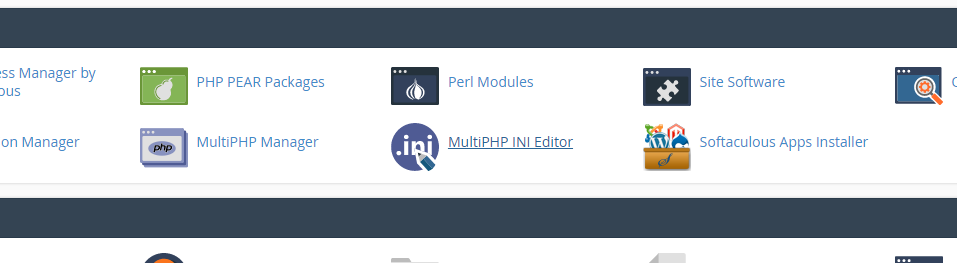
To do this, find the “MultiPHP INI Editor” link in cPanel:
Next, choose a domain:
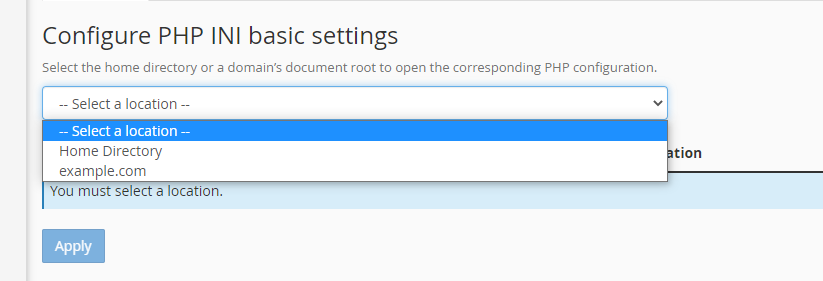
Note: Selecting “Home Directory” will set the default settings for all sites. Per-domain settings override these.

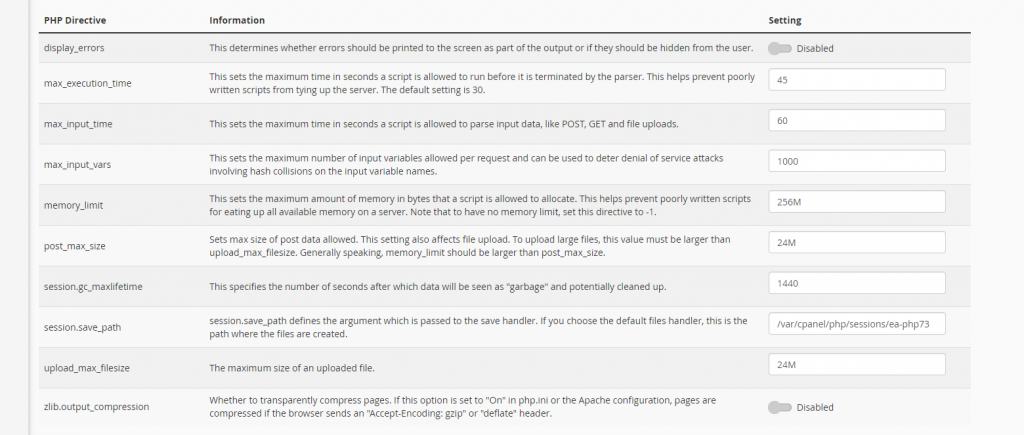
Find the variables you want to edit and change them – don’t forget to hit “Apply”!
Updated on November 14, 2021

What are your Feelings

  • Happy
  • Normal
  • Sad

Share This Article :

  • Facebook
  • X
  • LinkedIn
  • Pinterest
Add a Subdomain in cPanelCloudflare, WordPress, and Redirect Loops

© 2026 CynderHost

Powered by WordPress

To the top ↑ Up ↑