---
title: How To Create A Hello World Website
description: "To create a website, you'll need to use HTML to structure your site, CSS to style it, and Javascript to add advanced functionality. We'll be walking you through how to create a basic \"Hello World\" website that looks like this:…"
url: "https://know.cynderhost.com/docs/how-to-create-a-hello-world-website/"
updated: "2020-08-26"
category: Web Development
---
# How To Create A Hello World Website
To create a website, you'll need to use HTML to structure your site, CSS to style it, and Javascript to add advanced functionality. We'll be walking you through how to create a basic "Hello World" website that looks like this:

To begin, either open up a text editor or the cPanel file manager's text editor.
Next, put the following lines of code in the file:
```
My First Site Hello World!
```
Here's what each line does:
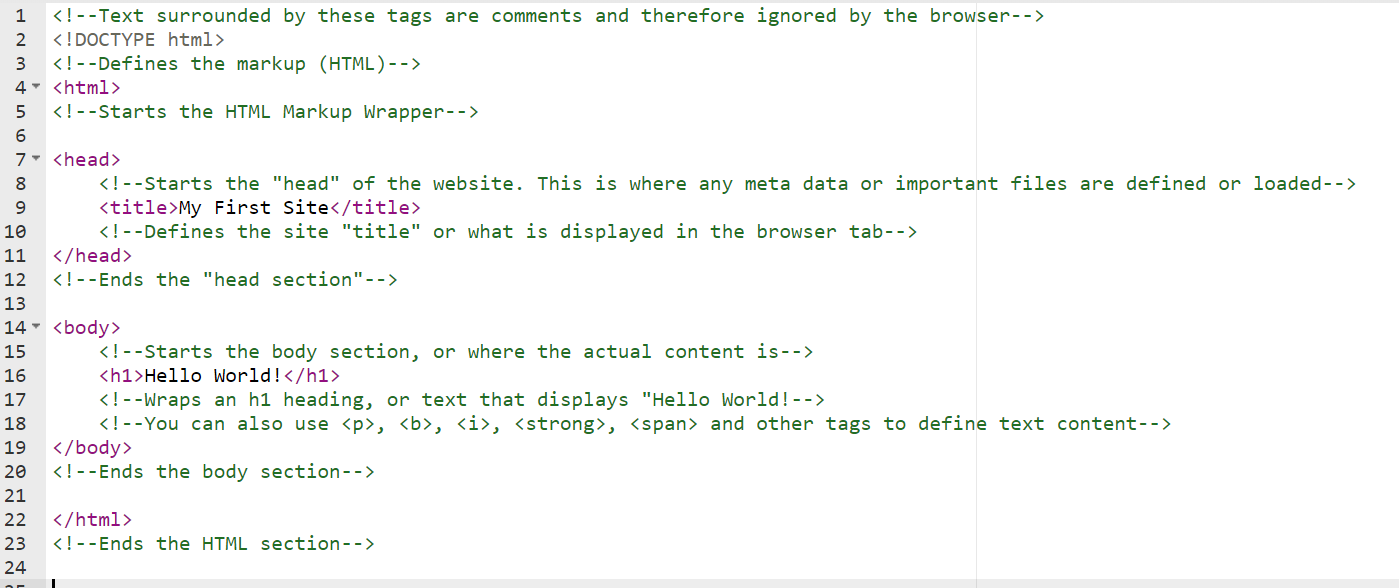
If you wanted to style this website, you could add the following CSS in a "
```
You can read more about HTML and CSS here:
[https://www.w3schools.com/html/html_css.asp](https://www.w3schools.com/html/html_css.asp)
[https://www.codecademy.com/catalog/language/html-css](https://www.codecademy.com/catalog/language/html-css)
[https://developer.mozilla.org/en-US/docs/Web/HTML](https://developer.mozilla.org/en-US/docs/Web/HTML)